
As a business owner, understanding site links and their importance in Google Ads is crucial to maximizing Google Ads performance.
Sitelinks are an important feature Google provides that can improve click-through rate and ad visibility when taken advantage of.
What do Sitelinks Look Like in Google Ads
Sitelinks are clickable links that appear beneath the main text of search or video ads that point users toward specific pages on a website. These are often pages such as Pricing, Contact Us, or Special Offers.
For example, we have this Little Caesars ad:
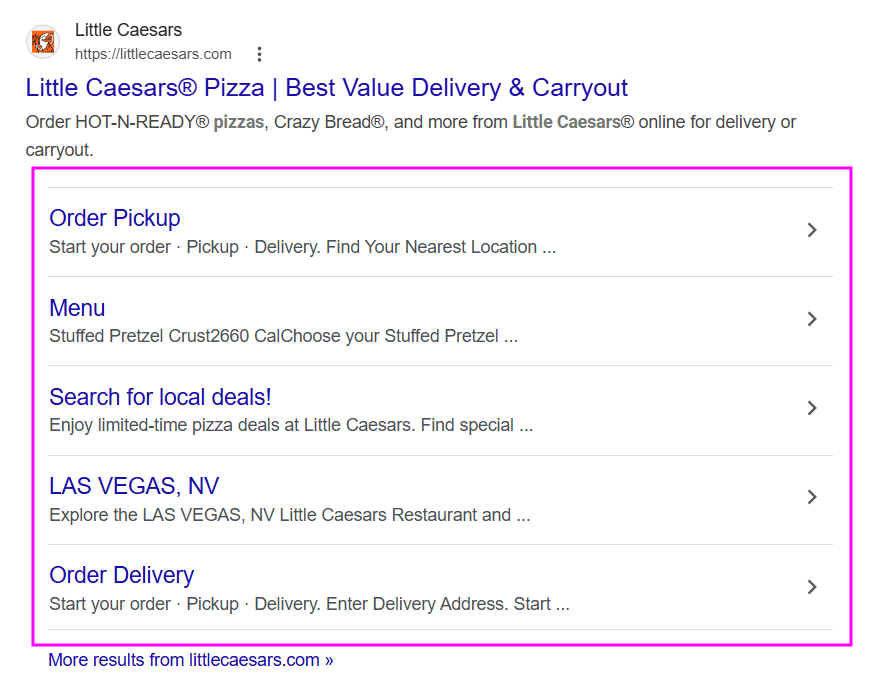
They include sitelinks to a page for ordering pickup and online, their menu, special local deals, and even one for a location near you.
This is supplying potential customers with everything that they would need to know or have available in order to buy from Little Caesars. This greatly increases the chances of people visiting these specific pages and placing an order.
When To Use Sitelinks
Using sitelinks is for important pages that generate conversions. Some examples include the About Us or Services/Pricing pages.
Try to use sitelinks when you think that the viewer would want more than one option for what page on your site to visit.
How To Add Sitelinks To Your Google Ads
Using these steps, you can add a sitelink to your Google Ads:
- In the account tree, choose the account, campaign, or ad group to add the sitelink.
- From the type list, select Ad assets > Sitelinks.
- Click Add sitelink.
- Pick a sitelink from your shared library.
- Click OK.
What’s the difference between sitelinks and ads?
The sitelinks feature allows you to put multiple landing pages on one ad, compared to the usual one primary landing page.
How many sitelinks per campaign?
Google allows for up to 20 sitelinks per ad campaign. Having at least 4 active is best for optimal performance. Desktop ads show 2-6, and mobile ads show 2-8.